
2 year warranty
Philips Support
How do I change my intensities on the Next-Generation Sonicare DiamondClean 8000 - 9900?
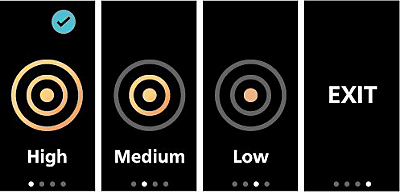
Our Sonicare toothbrush has three intensity settings: High, Medium, and Low. The default intensity is set to High. To change the intensity manually:
- From the Main Menu, swipe left or right to go to the Intensity screen.
- On the Intensity screen, press the Confirm Button to access the Selection Menu of Intensity.
- A check mark in the top right corner of the screen indicates the currently selected intensity.
- Swipe to browse available Intensities.
- Press the Confirm Button to select an intensity. A blue check mark confirms your choice and returns you to the Main Menu.
- The selected intensity appears on the Intensity screen.
- To exit without changing Intensities, select Exit in the Selection Menu.
Note: The intensity can be adjusted either prior to brushing or during the brushing by pressing the Confirm Button.
The information on this page applies to the following models: HX8533/11, HX8533/12, HX8533/15. Click here to show more product numbers ›
Frequently Asked Questions
What are the brushing modes for my Next-Generation DiamondClean 8000-9900?
How do I use the buttons and display on the Next-Generation DiamondClean 8000-9900?
How do I navigate the main menu on the Next-Generation DiamondClean 8000 - 9900?
How can I factory reset my Next-Generation Sonicare DiamondClean 8000 - 9900?
How do I activate my Instant Feedback: Scrubbing feature?
How do I charge my Next-Generation Sonicare DiamondClean 8000-9900 using the travel case?
What do the Post-Brushing Feedback: Duration screens indicate on my Next-Generation DiamondClean 8000 - 9990?
How do I check the battery status on my Next-Generation Sonicare DiamondClean 8000-9900?
How do I change my intensities on the Next-Generation Sonicare DiamondClean 8000 - 9900?
How do I choose the Instant Feedback I want on my Next-Generation DiamondClean?
How do I change the modes on my Next-Generation Sonicare DiamondClean 8000-9900?
How do I understand my Post-Brushing Feedback: Pressure?
How can I see my Post-Brushing Feedback on my Next-Generation DiamondClean handle?
How do I know when to replace my brush head on the Next-Generation DiamondClean 8000 - 9900?
How do I charge my Next-Generation Sonicare DiamondClean 8000 - 9900?
How do I setup my Next-Generation DiamondClean 8000 - 9900 for the first time and choose my language?
Looking for something else?
Discover all Philips Support options