
2 year warranty
Philips Support
How can I factory reset my Next-Generation Sonicare DiamondClean 8000 - 9900?
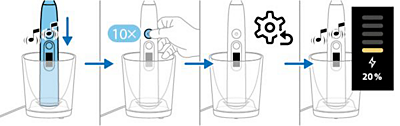
Follow the below steps to fix any screen issues or lights that are not lining up:
- Place the handle on a valid and plugged-in charger base to start charging. You can confirm this by the charging UI and the sound of two beeps.
- Press the on/pause button 10 times consecutively.
- The handle will then perform the reset process.
- Once the reset is complete, the handle will wake up and return to the charging state, this will be confirmed again by the charging UI and two beeps.
The information on this page applies to the following models: HX8533/11, HX8533/12, HX8533/15. Click here to show more product numbers ›
Frequently Asked Questions
What are the brushing modes for my Next-Generation DiamondClean 8000-9900?
How do I use the buttons and display on the Next-Generation DiamondClean 8000-9900?
How do I navigate the main menu on the Next-Generation DiamondClean 8000 - 9900?
How can I factory reset my Next-Generation Sonicare DiamondClean 8000 - 9900?
How do I activate my Instant Feedback: Scrubbing feature?
How do I charge my Next-Generation Sonicare DiamondClean 8000-9900 using the travel case?
What do the Post-Brushing Feedback: Duration screens indicate on my Next-Generation DiamondClean 8000 - 9990?
How do I check the battery status on my Next-Generation Sonicare DiamondClean 8000-9900?
How do I change my intensities on the Next-Generation Sonicare DiamondClean 8000 - 9900?
How do I choose the Instant Feedback I want on my Next-Generation DiamondClean?
How do I change the modes on my Next-Generation Sonicare DiamondClean 8000-9900?
How do I understand my Post-Brushing Feedback: Pressure?
How can I see my Post-Brushing Feedback on my Next-Generation DiamondClean handle?
How do I know when to replace my brush head on the Next-Generation DiamondClean 8000 - 9900?
How do I charge my Next-Generation Sonicare DiamondClean 8000 - 9900?
How do I setup my Next-Generation DiamondClean 8000 - 9900 for the first time and choose my language?
Looking for something else?
Discover all Philips Support options